I got this code while browsing through some blogs. It illustrates how to connect to Access Database using Javascript.
function Press()
{
var cn = new ActiveXObject("ADODB.Connection");
var strConn = "Provider=Microsoft.Jet.OLEDB.4.0;Data Source = test.mdb;Persist Security Info=False"; cn.Open(strConn); var rs = new ActiveXObject("ADODB.Recordset");
var SQL = "select * from Table1"; rs.Open(SQL, cn);
while(!rs.eof)
{
document.write(rs.Fields("Name").Value + "
");rs.MoveNext()
}
rs.Close();
cn.Close();
}
Showing posts with label JavaScript And Ajax. Show all posts
Showing posts with label JavaScript And Ajax. Show all posts
Tuesday, March 20, 2007
Access Database Using Javascript


Sunday, June 11, 2006
Drag n Drop in JavaScript
With Drag n Drop becoming so frequently used in web application these days, i found an article in http://www.javascriptkit.com very usefull.
I have implemented same in my blog. You can Drag the Title of my blog around and rearrange it as you wish. I used following bit of code from above mentioned site for the same.
This code along with little bit of AJAX can really give very pleasing results.
Create Following in your Css File
--------------------------------------
.drag{position:relative;cursor:hand;z-index:5}
Drag Drop Code Starts Here-
------------------
var dragapproved=false
var z,x,y
function move()
{
if (event.button==1&&dragapproved)
{
z.style.pixelLeft=temp1+event.clientX-x;
z.style.pixelTop=temp2+event.clientY-y;
return false
}
}
function drags()
{
if (!document.all)
return
if (event.srcElement.className=="drag")
{
dragapproved=true
z=event.srcElement
temp1=z.style.pixelLeft
temp2=z.style.pixelTop
x=event.clientX
y=event.clientY
document.onmousemove=move
}
}
document.onmousedown=drags
document.onmouseup=new Function("dragapproved=false")
Code Ends
------
Thursday, April 27, 2006
Debugging JavaScript in ASP.Net
An interesting and extremly use link explaining how to debug Javascript in asp.net
http://www.code101.com/Code101/DisplayArticle.aspx?cid=67
Tuesday, April 04, 2006
Horizontal scrollbars for ListBox Control
Absence of horizontal scrollbar in Listbox Control has haunted web application developers lot including yours truely. But a minor tweak can help us do the same easily.
You can use a the listbox inside a div tag<div id='hello' style="Z-INDEX: 102; OVERFLOW: auto; WIDTH: 100px; POSITION: static; HEIGHT: 100px" > <select size="6" multiple="true" id="iistbox" height="100px" width="100px"> <option>put some big string here</option> <option>11111111111111111111111</option> </select> </div>
Wednesday, February 15, 2006
XMLHttpRequest : Key to AJAX
Thanks to the XMLHttpRequest, web clients can retrieve and submit XML data for interim updates without reloading the page.
Creating XMLHttpRequest Object
Creating the XMLHttpRequest object depends on the browser. For Safari and Mozilla , we can use :
var req = mew XMLHttpRequest();
For IE , we use
var req = new ActiveXObject("Microsoft.XMLHTTP");
Hence we need to write a generic function to intialize the object
// Initialize the XMLHttpRequest object depending on type of browser
function Initialize()
{
try
{
req=new ActiveXObject("Msxml2.XMLHTTP");
}
catch(e)
{
try
{
req=new ActiveXObject("Microsoft.XMLHTTP");
}
catch(oc)
{
req=null;
}
}
if(!req&&typeof XMLHttpRequest!="undefined")
{
req=new XMLHttpRequest();
}
}
Object Methods
Of all supported methods by XMLHttpRequest, the most important one for us is the "open()" method.
The syntax of Open method is
open("method","URL",AsncFlag,"username","pwd");
The first parameter is HTTP method you intend to use , that is "GET" or "POST". The second parameter as name suggest, is the URL. The third parameter is optional and is a flag which controls wether incomign transaction should be handled asynchronosly. The default value is "true"
Tuesday, February 14, 2006
AJAX vs Classical Web Application
Classsical Web Application Model
Thw working of a classical web application can be summurized as this : An user action triggers a HTTP Request back to the web server. The server does the needed processing and returns an HTML page back to the client.
This approach is simple and makes sense. But there is a serious drawback.When the webserver is busy doing the processing, what is user doing ? User cannt do anything other than waiting for the Server response.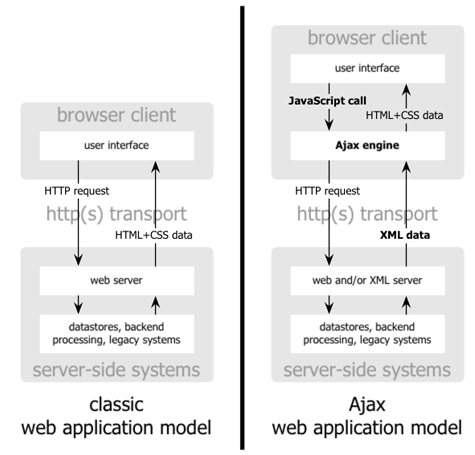
AJAX Model
AJAX model works in a slightly different way.It introduces a intermediate layer, known as the AJAX engine, between the user and the web server.
So when normal page would result in a HTTP request, an AJAX implementation would result in a javascript call to the AJAX engine. Any user response, that doesnt need a trip to server like simple validation are done by the engine without going to the web server. However if the engine needs to interact with server, then it does so using asynchronous request without stalling the user interaction with the page.
Usually the data retrivals are made using XMLHttpRequest object.
This makes the an AJAX implemented page much faster to user interactions. However the technology is still in development stages and need to improve a lot.
Some of the best implemention of AJAX is the Google Suggest, Gmail etc.
Friday, January 13, 2006
Google Suggest Implementation
Google Suggest has inspired awe all around the globe. This innovative feature implemented by the search engine king brought a idea which many a people wanted in thier web applications.
I have tried to do the same.For starters i would sugegst to look at the code code by Gavi Narra in Code Projects. Its a very well wrtten article.
However i found couple of featuers missing in Gavi's implementation and decided to add those myself.
Have a look at my code @ Planet-source-code.com
http://www.planet-source-code.com/vb/scripts/ShowCode.asp?txtCodeId=4398&lngWId=10
Subscribe to:
Posts (Atom)


